
Spotify is a Swedish audio streaming and media services provider founded in 2006. It is the world’s largest music streaming service provider, with over 356 million monthly active users, including 158 million paying subscribers (March 2021). Many people are looking for a way to connect with others more online.
One feature that is not used commonly on Spotify is the share music feature. This case study shows a new easy-to-use feature that allows a user to share music with their friends quickly and painlessly. Below are the steps and reasonings that I took to accomplish creating this new feature.

The goal was to create a mobile application feature that allows users to share music with their friends quickly and painlessly.
The target user was someone who uses the Spotify application on their mobile device.
Interviews
User Persona
Empathy Map
Problem Statement
Ideation
Storyboarding
User Flow
Wireframes
UI Designs
Usability Testing
I conducted two rounds of interviews for this project. The first round was aimed to get a general feel of why my participants shared music with others or why they don’t as well. I asked general questions to keep the answers open.
The second round I dug deeper into why my participants liked to share music. How did it make them feel, what were the pain points when sharing music, why do they share music with the people that you do ect. Below are a summary of my findings.
My participants usually only share music with their mobile devices. My participants will either share by taking a screenshot of the individual song screen and then send it to someone. Also my participants will type the song and artist out in a message and send it to someone.
I found that my participants will only share individual songs instead of playlists, albums etc. That is because listening to one song is enough. That’s an easy task to accomplish. If someone asks my participants to listen to multiple songs, it just becomes too cumbersome and could cause them to not listen to any of them.
My participants will also only share music with people that they know. And not just anyone that they know, only people that they have a knowledge of what their taste in music is.
The music that my participants share is usually only new music. If the song has been out for a while my participants assume they have already heard it and there is no use in sharing it with them. One reason my participants enjoy sharing new music with someone is that they feel like they are “breaking news” to them. They get to see their initial raw reaction to the song they think they will like. They like to be the ones responsible for the new thing they like and enjoy.
My participants also explained that sharing new music with someone who hasn’t heard it yet makes them feel “ahead of the trend” or “superior” to them. It’s like a secret they know but the other person doesn’t.
However, I found out that my participants will only share with people that they know their taste in music because if the person comes back and says they didn’t like the song they become embarrassed
After conducting my two rounds of interviews with my participants I then was able to create my persona. Brandon is a 32-year-old man who is married and enjoys listening to music while he is cooking, working out, driving and ect. Brandon also likes to share new music that he listens to with his friends who he thinks haven’t heard it yet. Sometimes when he wants to share music, he is too busy with activities and sharing music can just be too time-consuming. Brandon pays for Spotify premium to listen to all of his music as well.

After identifying the pain points from my research I started to think of what problems this feature will solve and narrowed it down to three possible problem statements:
1. When sharing an artist/band with a friend, how might we see if they decided to follow that artist/band.
2. When a friend has already listened to a song, how might we see that?
3. When a friend listens to a song, how might we know who listened to it first so we do not share it with them?
To help me choose which problem statement I wanted to move forward with I used an activity called “Crazy 8’s.” This method is creating eight sketches at a time in a 5 minute time period to help with ideas on how to solve these problems.
I did 3 rounds and one of the people that participated in my interviews did a round of Crazy 8’s as well, which produced a lot of good ideas and some that were not. I found that the more I did these the more in detail I became which produced better ideas.
After finishing my Crazy 8’s exercise it became clear which problem statement I was going to move forward and solve because I found myself trying to solve this problem the most. The problem I was going to solve was:
“When a friend listens to a song, how might we know who listened to it first so we do not share it with them?”


I took a couple of ideas I created in my Crazy 8’s exercise and developed them out drawing the whole process of sharing a song. I tried to keep the process very simple and short because that was one of the problems in the first place, it takes too long to share.
After creating my two storyboard ideas I decided to go with the second set of drawings because it backed up my interview summaries the best.
I created a simple way of just swiping left on the album art when you are on the individual song screen which would populate a list of nine friend profiles that you can share the song with.


Taking the sketches from my ideations and storyboards I was able to create a user flow that would map out each screen a user would visit if they decided to either share a song with a friend or choose not to.

Because I was adding a feature to an existing application, I was able to use screenshots and elements from pre-made UI kits in the Figma community to move straight to my hi-fidelity wireframes. To develop these wireframes I used my ideations and storyboard sketches to develop all the screens in my user flow.


In my first round of user testing, one of my participants made a discovery that made a major difference in my new feature. In my first design, I prototyped the share feature to appear when the user would swipe the album art to the left. My participant brought up that he thought there was already a function for that on Spotify. It turns out Spotify uses that function as one of their ways to skip to the next song.
Because of this I went back and researched the Spotify application to see what other functions occurred when swiping the album art in different directions. If the user swiped down it would take them back to the playlist or song list screen. And if you swiped to the right it would take the user back to the previous song.
I would find out that when a user swipes up that there isn’t always a function that happens. For only some songs “Genius Lyrics” appear when swiping up. Because this wasn’t a common function for Spotify I decided to use this method of swiping up to reveal my share feature.
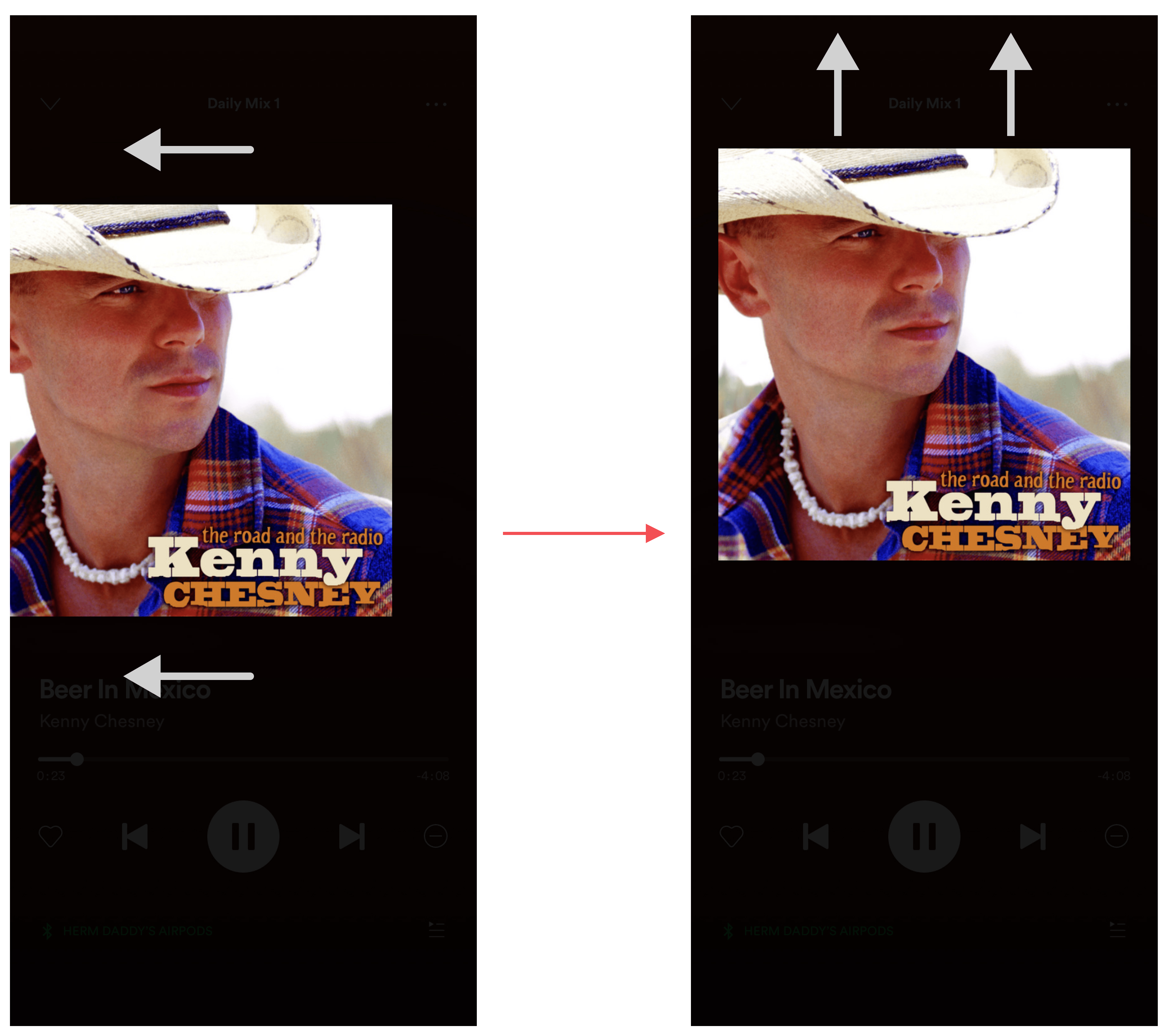

One common problem my participants were having when I was doing my user testing was they did not know what do to so they could share the song they were listening to. The current version of Spotify has its share feature hidden in the three-dot icon in the top right of the screen. It is then found in a list of other functions as you scroll down.
To fix this I created an automated prompt that would show users where the new share feature is when they first view an individual song after an update or the application is downloaded. It will slide up the album art and reveal the profile images and names halfway to show the user what they need to do and then will slide back down to its normal position.
During my interviews, I learned that my participants only like to share songs if they think the other person has not heard them yet. Because of this, I needed a way to show if a user has listened to the song they are wanting to share yet or not. To accomplish this I darkened the profile picture and name text like an inactive button to show that this user has already listened to it.

Adding a feature to an existing application created challenges that were not involved when you are working on an application from scratch. Adding a new feature to an accomplished company like Spotify makes you re-think some of your decisions and ask yourself, “Why havn’’t they done this yet?” “If it was a good idea they would have created this feature already.” But there is always somewhere to improve and that doesn’t exclude Spotify. So I trusted my research and began my development of creating a new feature for Spotify.
Looking back I enjoyed working on this application because it is something that I use every day of my life almost. So getting the opportunity to work on this application was enjoyable and educational.